
TypingVE
Keep your hands on the keyboard.
TypingVE helps you focus on typing with less switching between the keyboard and mouse. It lets you move the cursor and use custom shortcuts with the letter keys. It works across apps without plugins, so you can use it wherever you type.
How it works
Move the cursor with your keyboard.
Letter keys become cursor controls, keeping movement close to where your hands already rest. Move by character, word, line, or page, and combine movement with selection to highlight text.
Command mode
In Vim-style command mode, a single letter performs a movement. I, J, K, and L move up, left, down, and right. H and P move one word left or right, while U and O send Home and End. N and M send Page Up and Page Down.
Direct shortcuts
Emacs-style shortcuts combine a modifier with a letter, so movement works without entering command mode. For example, Caps Lock + J moves left.
Custom key mapping
Make familiar actions easier to reach.
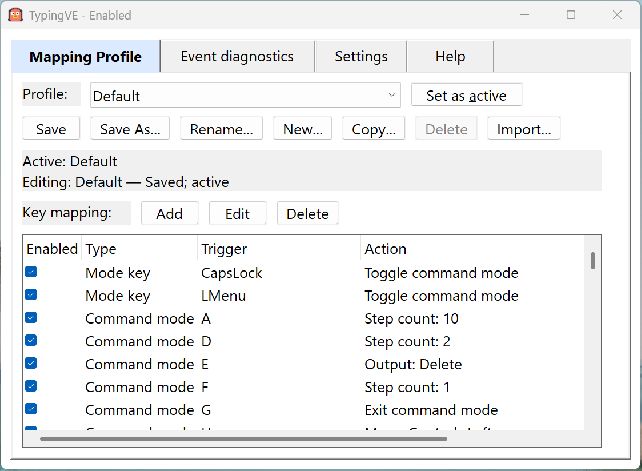
Map a convenient key or key combination to an editing shortcut, another key combination, or a built-in command. For example, Left Alt + C can send Ctrl + C. Other commands can insert the current date or time.
The visual mapping editor shows each trigger beside its action. Shortcut recording captures key combinations directly, including left and right modifiers.
Downloads & links
Download TypingVE 1.5.2
Released 18 November 2026. Download directly from xdetail.org, without needing access to GitHub.
The release reports verification of both builds on Windows 11 x64, including x86 through WOW64. The x86 build also targets Windows 7 SP1 and Windows 10. Actual execution on Windows 7/10 has not been tested.
- TypingVE privacy policy
- User guide
- GitHub: aldetl/TypingVE
- Release notes
- Source ZIP · 2.16 MB
- SHA-256 checksums
Source-available under Apache 2.0 with Commons Clause 1.0 and the project-origin attribution condition. Project notice · Third-party notices · Artwork terms